The whole school’s timetable, in one go
The engine places each subject’s weekly hours inside the school’s day template, on working days, without ever putting a class, a teacher or a room in two places at once.
A proposal, never a done deal
You pick one class, one level or the whole school. The engine proposes a timetable and shows what it placed, then what it could not place, with the reason for every hour left out. Nothing is written until the school approves.
A teacher is not always available
This is the constraint that breaks spreadsheet timetables, because it has three forms and only one of them is usually remembered. MadrassaDesk holds all three.
They never come on certain days
The Saturday part-timer, the outside specialist, the half-time contract. Their closed slots are declared once for the year: manual entry refuses them and generation never uses them.
They are away on specific dates
Leave, illness, training, a mission. The weekly timetable does not change: it is that day’s lessons that become uncovered, and they come up to be dealt with.
They are there, but only up to a volume
So many hours a week, so many a day, no more than so many in a row, and for some, two days of presence and not three. These are planning ceilings: generation does not exceed them, and if the school wants to go beyond for one particular week, it can, the software merely warns.
The rule is worth stating: what is physically impossible is refused, what is merely over a volume is flagged. Software that confuses the two becomes either unusable or untruthful.
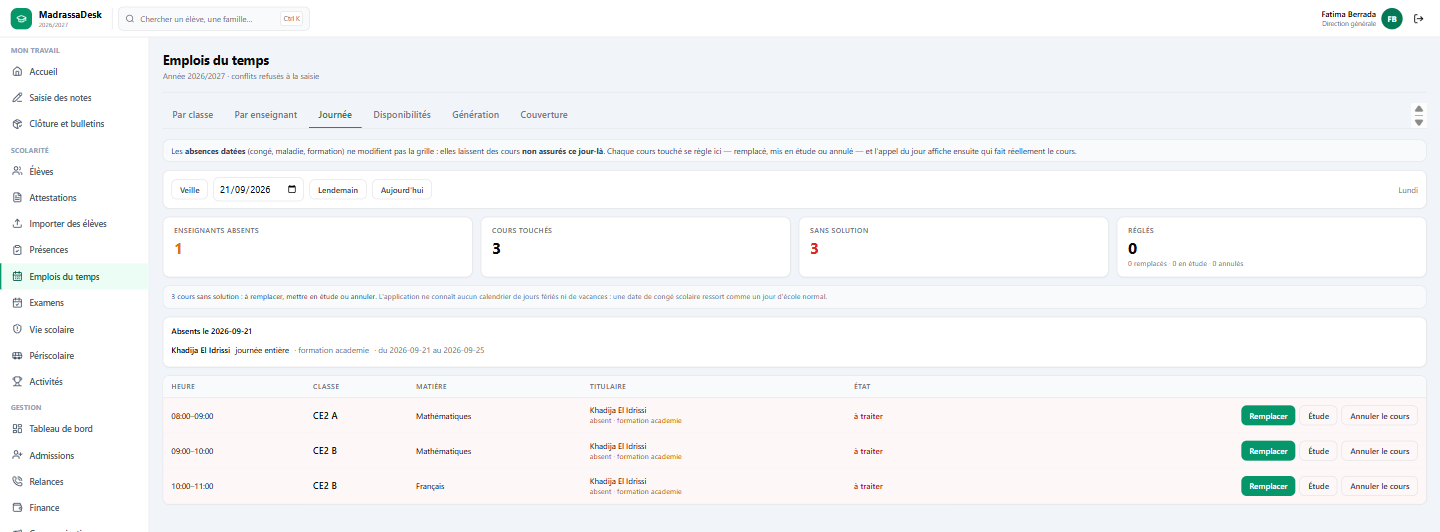
Today’s uncovered lessons
Three decisions, and no more
- Covered by a teacher who is genuinely free at that hour.
- Supervised study: the class is looked after, the syllabus does not move on.
- Cancelled.
A lesson with no decision stays in red until someone settles it.
The day board says who is away, which lessons fall, and proposes possible cover. Possible means verified: not teaching elsewhere, not closed on that weekday, not absent on that date, not supervising an exam, not already called to cover another lesson at the same hour.
Teachers of the subject come first, because only they can move the syllabus on. Then those who know the class, then the least loaded. The software chooses nobody: it shows who can, and the school decides.
Once the decision is taken, the day’s register shows the teacher who actually takes the lesson, not the one in the timetable.
The September check
An hour that “cannot be placed” does not say where the problem comes from. Before generation even runs, MadrassaDesk compares, for each teacher, the hours their assignments demand against the hours they actually have open, once their closed slots are removed and their ceilings applied.
When somebody has more hours assigned than hours open, it is written out in full: the timetable could do nothing, it is the assignments that must change. That is the kind of finding you want in August, not in October.