↓
MADRASSADESK

Every child handed over to the right person

The parent badges at the gate, the child’s first name appears on the courtyard TV, and the supervisor sees on the tablet the adult’s face and the children they may collect. One tap to confirm, and the family is told.
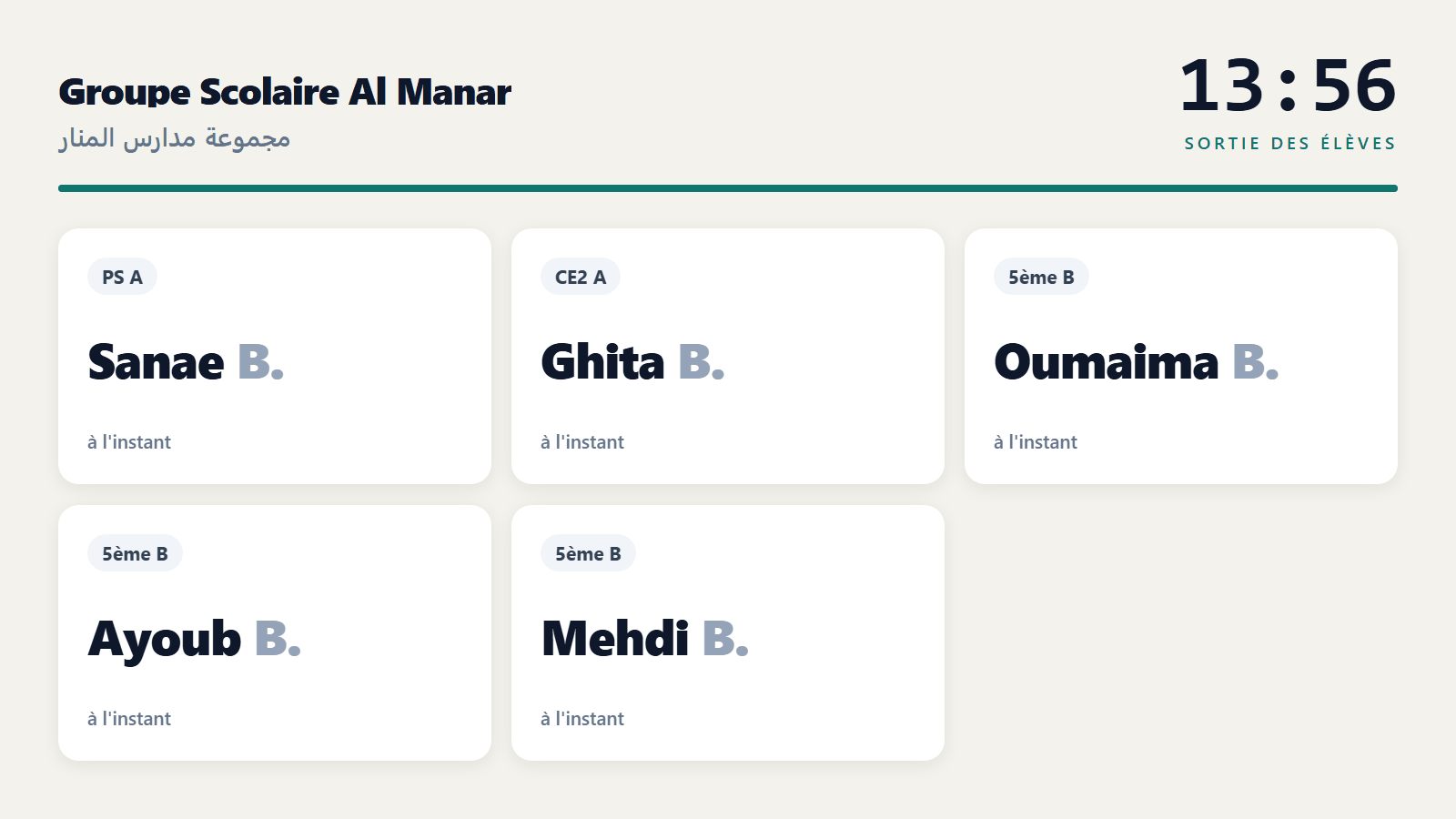
The TV call screen: first name, initial and class. No surname, no photo.
16:30 · End of classes

Three steps, and nobody shouts names at the gate any more
1 · The parent badges
Their NFC or QR card, or the grandparent’s, the driver’s, the nanny’s: every authorised adult has their own, in their name, with their photo.
2 · The child is called
First name and class appear on the courtyard TV. The child comes down, and the call disappears once handed over.
3 · The gate confirms
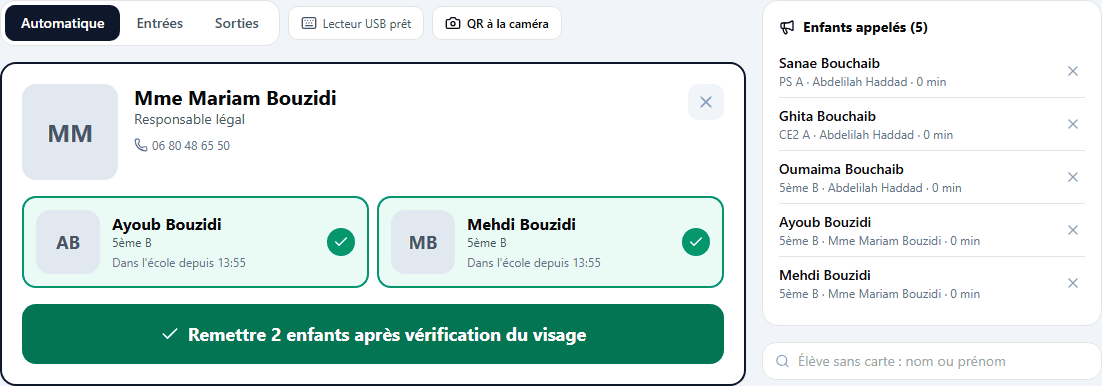
The supervisor checks the face against the photo, ticks the children and confirms. The family reads “handed over to … at 4:42 pm” in the app.
The gate kiosk: the authorised adult, their ID and the children they may collect.
07:45 · Arrival

Who has arrived and who is late, before roll call

Pupils badge on the way in. The start time and grace period are the school’s own: lateness is computed automatically, and the day board shows who is not in yet.

The badge suggests, the roll call decides: a card can be lent. The teacher pulls the check-in into the roll call, checks the class and validates. Only a validated roll call counts on the report.

17:00 · The difficult cases

What the gate does when it is not simple

A forbidden person
A court decision or a written request from a legal guardian: the handover is blocked and an alert goes to the management.
A lost card
Revoked in one click. If it is shown later, it is recognised as revoked and never accepted.
A forgotten card
The supervisor finds the registered adult, sees their photo and hands the child over with a reason. Everything is logged.
Someone not registered
Only the management can decide an exceptional handover, after a parent’s consent by phone, with the ID noted.
The pupil who goes home alone
The legal guardian allows it in the app. Without that permission, leaving alone is refused at the gate.
An uncle for one week
A permission can carry a start and an end date: it switches itself off.
18:00 · For families

Parents decide who may come

In the app, parents see their child’s arrival and departure times, the list of authorised people, and ask to add someone. The school validates that person on their first visit, ID in hand, and gives them their card.

Equipment

What the gate needs

The equipment is paid for by the school: it buys it wherever it likes, and we give it the list. The software is included in full management.

A reader
A USB NFC or QR reader plugged into a computer or tablet, or simply an Android tablet, whose NFC and camera are enough.
Cards
13.56 MHz cards in bank-card size. MadrassaDesk prints the sheet: name, class or relation to the child, photo, QR.
A screen
Any TV with a browser, an HDMI stick or a small computer. You open the screen link on it, no account needed.
Data

What is kept, and what is not

Nothing readable on the card
The card code is never stored in clear: a copy of the database cannot be used to forge one.
No biometrics
No fingerprints, no face recognition: the photo is for the supervisor’s eyes, not for a machine.
A retention period
Check-ins and handovers are erased after the period chosen by the school, twelve months by default.
A tablet that opens nothing
The gate account only sees the kiosk: a tablet left at the entrance opens no pupil record.

Check-in, child handover and the TV screen are part of the full management plan.

Request a demo