Your whole school, in one application
Admissions, timetable, marks and reports in French and in Arabic, attendance, finance, discipline. One application, under your school’s name, on a computer as well as on a phone.
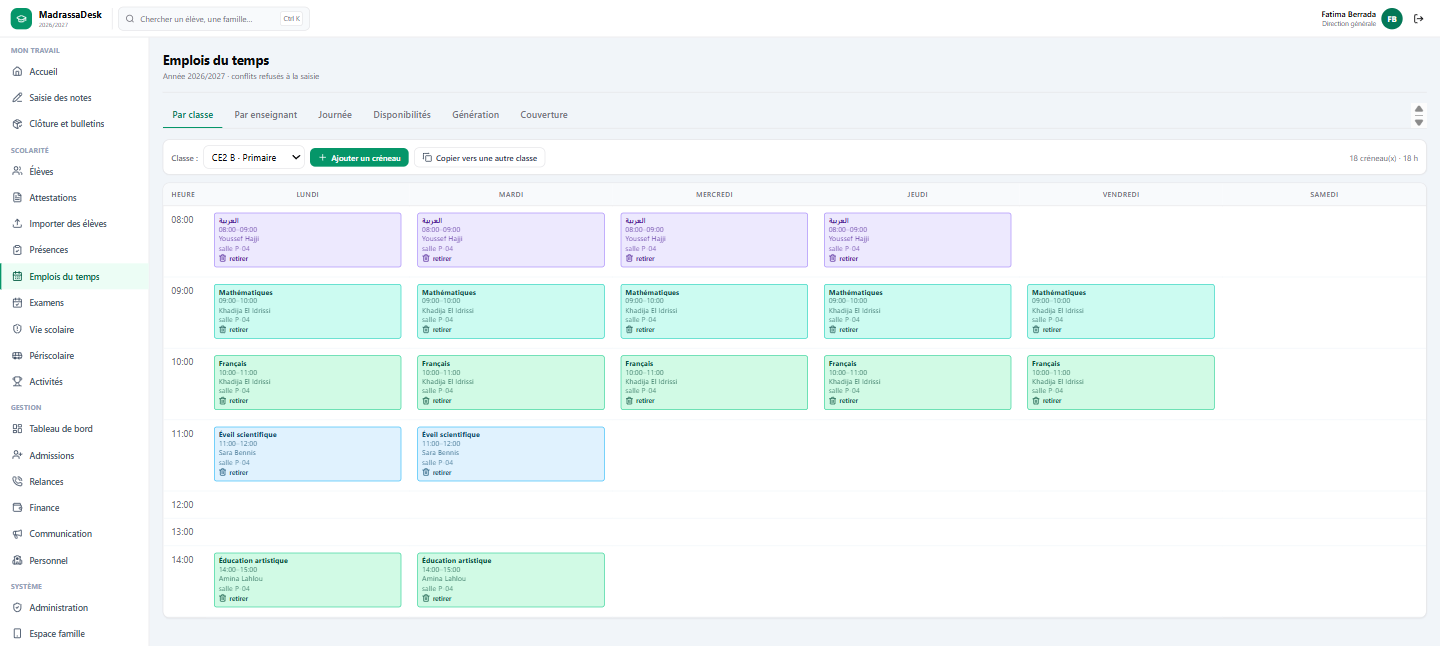
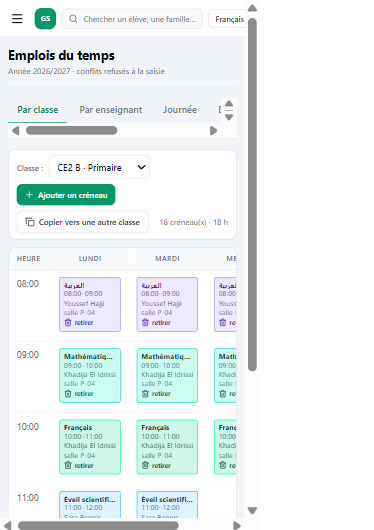
Real screens from the application, on a fictitious school’s data. Nothing is mocked up.
French, Moroccan Arabic and English in the application. Reports in French and Arabic.
Your name, your logo and your colour, everywhere in the application.
A browser is enough, at the office and on a phone. Automatic backup every night.
Eight modules that talk to each other
A private school does not lose time inside one piece of software: it loses it between two, retyping the same family into the admissions book, the mark book and the payments register. Here a pupil is entered once.
From the family’s enquiry to an enrolled pupil, with no gap in the file.
- Admission request, traced exchanges, waiting list.
- Required documents: شهادة المغادرة, birth certificate, guardian’s ID. While a document is missing, enrolment cannot be completed.
- A priced quote built on the level’s fee scale, deposit recorded as family credit and applied automatically at enrolment.
The whole school’s timetable is generated in one go, and refuses the impossible.
- Generation for one class, one level or the whole school, from the official weekly hours.
- A teacher, a class and a room cannot be in two places at once: the clash is refused as you type, not reported afterwards.
- Closed slots, dated absences, service ceilings: whatever cannot be placed is listed with its reason, never forced.
One place computes an average, and a published report never changes.
- Entry by subject, absence codes, coefficients and rounding set by the school.
- Two report models: the national framework and the school’s own, in French and in Arabic.
- Twelve checks before publication; a published report is frozen and reads as it was handed over.
Roll call, gate check-in, child handover, school life.
- Roll call by half-day or by lesson, absence notes, counts per term; only validated roll calls count on the report.
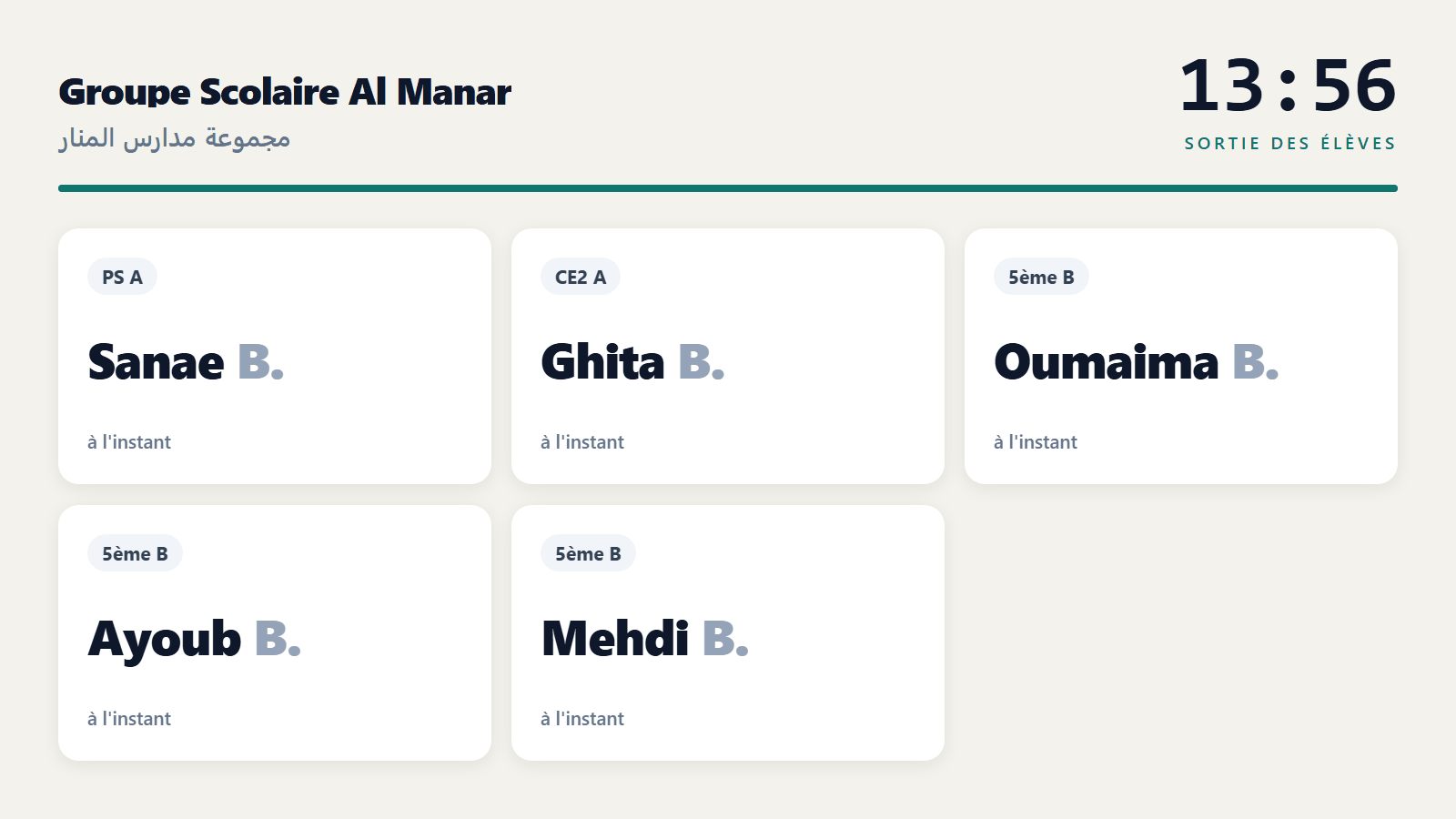
- NFC or QR badge at the gate on the way in and out, every child handed over only to an authorised person, first name called on the courtyard screen.
- Incidents and sanctions: the family only sees what it has been notified of.
Payment schedules, receipts with continuous numbering, prepared reminders.
- Fees by level, automatic schedules, after-school services billed to whoever signed up (canteen, transport, study).
- Payments to the centime, receipts numbered in a continuous series: a number is never reused and never deleted.
- One unified reminder queue, message prepared, sending decided by a person.
Sessions, papers, rooms, invigilation shared out without clashes.
- Pupils allocated to rooms according to their real capacity.
- A subject teacher does not invigilate their own group: that is refused as you type.
- A teacher absent or unavailable on the exam date is not proposed as an invigilator.
A parent sees what concerns them, and nothing else.
- Reports, notified absences, payment dates, activities and parental permissions.
- A parent only reaches their own children’s documents: verified, refused otherwise.
- Pupil accounts in lower and upper secondary.
The dashboard, the staff, the school’s own rules.
- Terms, coefficients, grades, subjects, rooms, fee scale: the rules are configured, not hard-coded.
- Staff accounts created by the school, initial password shown once only, an account is deactivated rather than deleted.
- Action log: who entered what, and when.
The timetable, for real
This is the work nobody wants to redo in September. MadrassaDesk generates it for one class, one level or the whole school, from each subject’s weekly hours, and it refuses what is impossible instead of reporting it afterwards.
It also holds what no spreadsheet holds: a teacher is not always available. The part-timer who only comes on Saturday, next Thursday’s training course, the half-time contract capped at twelve hours. Each one is declared, and the timetable takes it into account.
What is refused as you type
- A teacher in two places at once.
- A class with two lessons at the same time.
- A room booked twice.
- A lesson placed on a closed slot.
Your school is what shows, not our software
Your name, your logo and your colour replace ours throughout the application: on the sign-in screen families see, in the header, on the buttons. Only one colour is asked for, the shades are derived from it.
Each person picks their own working language: the head of school in French, a teacher in Moroccan Arabic, a visiting teacher in English, on the same data.
School software is also judged on what it refuses
An application that accepts everything produces documents the school cannot defend in front of a family. MadrassaDesk says no, and says why.
Three ways to start
A school does not always need everything at once. MadrassaDesk comes in tiers, and moving from one to the next never means re-entering what is already there.
Moving from Liaison to full management
Nothing is re-entered. The pupils, classes and timetable entered under Liaison are the same ones that feed the extra modules the day the school moves to full management.
How a school starts
Every child handed over to the right person
The parent badges at the gate, the child’s first name appears on the courtyard TV, the supervisor checks the face and confirms. A forbidden person is blocked, a lost card is recognised.
Do you run an msid or a Quranic school?
Thoumoun tracks each child’s memorization without the fqih writing, and it is free for associations.
What heads of school ask
Is the application in Arabic?
The screens exist in French, Moroccan Arabic and English, and each person picks their language. Reports exist in French and Arabic, with two models: the national one and the school’s own. The Arabic subject glossary is agreed with the school before the first report is handed out.
Is our data ours?
Yes. It is yours, exportable, and backed up automatically every night. Before a single real pupil is entered, the school and we put in place what personal data protection requires in Morocco, including the CNDP declaration.
Does anything need installing?
No. A recent browser is enough, on a computer or a phone. The documents produced, reports and receipts, are PDFs you print or send.
What about the Massar export?
Each pupil’s Massar code is kept in their file. The Massar-format export is not delivered yet: it needs a real school file to be built without inventing a format. So we do not promise it as an available feature.
How much does it cost?
The price depends on the tier you choose (Liaison or full management), on the school’s cycle, and on what you migrate from your existing system. It is given after the demo, in writing, and there is no hidden subscription to a third-party service.
Can we control who collects the children?
Yes, with full management. Every authorised adult has an NFC or QR card, the gate kiosk shows their face and the children they may collect, and the child’s first name appears on the courtyard TV. A forbidden person is blocked.
Request a demo
One hour, by video call or at your school. You will see the software on your own cases: your levels, your subjects, your fee scale.